Tampilkan postingan dengan label Template. Tampilkan semua postingan

30 Jun 2017

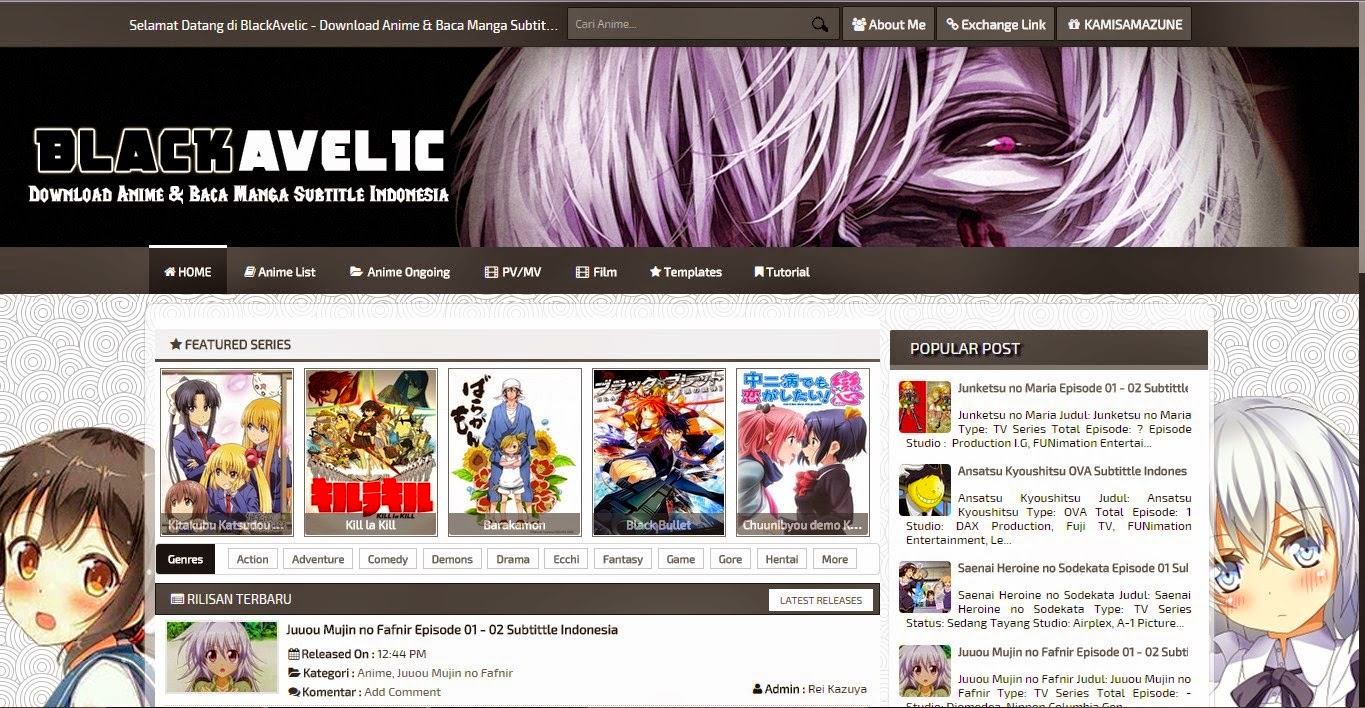
BlackAvelic Template Blogger


Theme Name: BlackAvelic Template Blogger
Version: 2.0
Designer: iMoechan
Category: Free Template
Release: 14 February 2015
Features :
- Top Menu
- Genre Box
- Recent Post Manga
- 404 Page Not Found
- Fontawesome
- Etc.


Hai Minna-san , Admin Terkece Balik Lagi nih Membagikan Template
Kali ini Template ya Bernama
BlackAvelic Template Blogger

Langsung aja deh Di cek fitur ya , Lalu Didownload langsung yah :)

Saya Harap jika anda menggunakan Template ini, Jangan Menghapus Link Credit :)

How to Change Template

1.Log in to your Blogger dashboard and go to Layout > Edit HTML.
2.Please back up your old template in case you decide to use it again. To do this, click on the "download full template" link and save the file.
3.Then, browse the location of XML template that you've just downloaded and press "upload".

Edit Meta Tag

1.Go to Blogger.com log in your account blog
2.Your Blog > Template > Edit Html
3.Find (CTRL + F)
<meta content='KEYWORDS' name='keywords'/>
<meta content='DESCRIPTIONS' name='description'/>
change with your ID Google+

Read More

Kimi no Uso Template Blogger

Kimi no Uso Template Blogger


Theme Name: Kimi no Uso Template Blogger
Version: 2.0
Designer: iMoechan
Category: Responsive Free Template
Release: 09 February 2015
Features :
- Responsives
- ADS
- 404 Page Not Found
- Random Slider Post
- Fontawesome
- Etc.


Hai Minna-san , Admin Terkece Balik Lagi nih Membagikan Template
Kali ini Template ya Bernama Kimi no Uso Template Blogger
Langsung aja deh Di cek fitur ya , Lalu Didownload langsung yah :)

Saya Harap jika anda menggunakan Template ini, Jangan Menghapus Link Credit :)

How to Change Template

1.Log in to your Blogger dashboard and go to Layout > Edit HTML.
2.Please back up your old template in case you decide to use it again. To do this, click on the "download full template" link and save the file.
3.Then, browse the location of XML template that you've just downloaded and press "upload".

Edit Meta Tag

1.Go to Blogger.com log in your account blog
2.Your Blog > Template > Edit Html
3.Find (CTRL + F)
<meta content='KEYW
ORDS' name='keywords'/>
<meta content='DESCRIPTIONS' name='description'/>
change with your ID Google+

How to Use Random Slider Post

1.Go to Blogger.com log in your account blog.
2.Your Blog > Template > Edit Html.
3.Find (CTRL + F)
4.'http://animelolikawai.blogspot.com/',
5.Change with your Blog

Fix Menu if you use Description

1.Go to Blogger.com log in your account blog.
2.Go to Layout
3.Delete Description in your Header

Fix Post Style

1.Go to Blogger.com log in your account blog.
2.Go to Edit Html
3.Find (CTRL + F)
4.<span class='post-author'>
5.Full code is
<span class='post-author'>
        <b:if cond='data:top.showAuthor'>
          <b:if cond='data:post.authorProfileUrl'><i class='fontawesome-calendar'/><b>Diposting:</b> 
              <span class='fn' itemprop='author' itemscope='itemscope' itemtype='http://schema.org/Person'>
                <span itemprop='name'><data:post.author/></span>
              </span>
            </b:if>
        </b:if>
      </span>
6.Delete All and Save Template

Read More

OTAKUNEWS Template Blogger

OTAKUNEWS Template Blogger

Theme Name: OTAKUNEWS Template Blogger
Version: 1.5
Designer: iMoechan
Category: Free Template
Release: 05 February 2015
Features :
- SEO 100%
- Responsives
- ADS
- Recent Posts
- 404 Page Not Found
- Random Slider Post
- 4 Style Template
- Fontawesome
- Etc.


Saya Harap jika anda menggunakan Template ini, Jangan Menghapus Link Credit :)

How to Change Template

1.Log in to your Blogger dashboard and go to Layout > Edit HTML.
2.Please back up your old template in case you decide to use it again. To do this, click on the "download full template" link and save the file.
3.Then, browse the location of XML template that you've just downloaded and press "upload".

Edit Meta Tag

1.Go to Blogger.com log in your account blog
2.Your Blog > Template > Edit Html
3.Find (CTRL + F)
<meta content='KEYWORDS' name='keywords'/>
<meta content='DESCRIPTIONS' name='description'/>
change with your ID Google+

How to Use Random Slider Post

1.Go to Blogger.com log in your account blog.
2.Your Blog > Template > Edit Html.
3.Find (CTRL + F)
4.'http://animelolikawai.blogspot.com/',
5.Change with your Blog

Setting Recent Post

1.Go to Blogger.com log in your account blog.
2.Go to Layout.
3.Add Gadget HTML/JavaScript
4.Add this Code <script type="text/javascript">var numposts =5;var showpostthumbnails = true;var displaymore = false;var displayseparator = false;var showcommentnum = false;var showpostdate = false;var showpostsummary = true;var numchars = 95;</script>
<script src="/feeds/posts/default/-/Entertainment?published&amp;alt=json-in-script&amp;callback=labelthumbs" type="text/javascript"></script>
5.Change Entertainment with your Label
Read More

9 Mei 2016

Hatsune Miku PV Blogger Template v1.1

previously I've shared a tutorial How to Add a Progress Bar with Bootstrap. Today I will share a template for PV themed blue with pictures hatsune miku. this is my first template with the theme of PV. I hope you like it. by post grid design, custom post pv, defer videos and so forth. but I forgot to add the widget in footer maybe next version I will add the widget in footer.
Example Post i get from http://kara-tsuru.com and header image from konachan.net
Hatsune Miku PV Blogger Template v1.1
Cmonfrozen Share Template Anime Hatsune Miku PV Blogger Template v1.1
Description Template

Hatsune Miku PV Anime Blogger Template is a template for Share PV or video like a Blog PV or Blog AMV with Custom Post for PV, and defer video for optimize loading blog.

This template is responsive, 2 column and colored blue with pictures hatsune miku from konachan.

Note : Click Button "How To Configure Template" for setting this template

Fix Lightbox : Go to HTML Editor, Add this CSS .CSS_LIGHTBOX{z-index:200!important;} before */]]></b:skin>

Document (Only) Template (Only) Live Preview How to Configure Template
  • Responsive
  • 2 Column
  • PSD Header
  • Optimize
  • SEO
  • Custom Post PV
  • Pagination
  • Spetific Label
  • Genre Dropdown
  • Search Box
  • Document
  • Remove Footer credits
Read More

20 Apr 2016

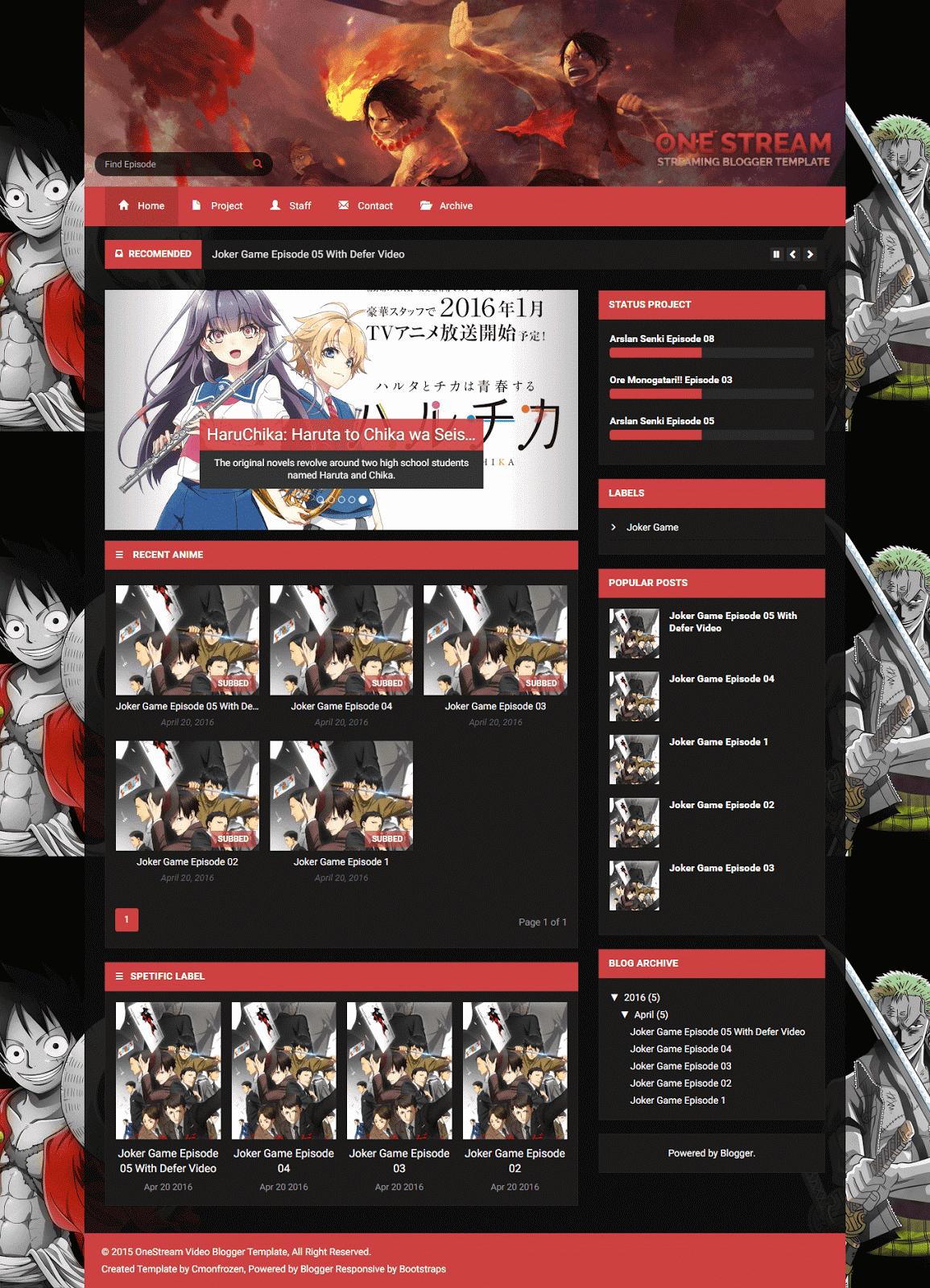
OneStream Streaming Blogger Template v1.3

OneStream Streaming Blogger Template - is streaming the first template I created, I was challenged to design a dark color. because I see the design of streaming anime is dark. made me think hard to make designs with dark and the results are quite impressive to behold :D
Thank you for misscelles-d4p7e2i and ferdiferrah-d4lv08g for image one piece make my design is awesome :D
Cover Streaming Anime Blogger Template
Preview OneStreaming Anime Video Blogger Template
Description Template

OneStream Video Blogger Template is a template for Video, Movies, and Streaming anime with Newsticker, Carousel Slider and Spetific label, Defer Video for optimize loading blog, Searchbox, Turn off light in the post, Download button with spoiler/collapse and more important this template support RTL Blog.

This template is responsive, 2 column and colored dark and red with awesome features have well documented and PSD Header.

Note : Click Button "How To Configure Template" for setting this template
Change Thumbnail Post : Add HTML Image into iframe <iframe><img src="" alt="" title=""/></iframe> < example Add Thumbnail Post
from folder Document One Stream Blogger Template > Post - Streaming.txt

Log : Update v1.3 [5/7/16]

Documents (Only) Template (Only) Live Preview How to Configure Template
  • PSD Header
  • Responsive
  • Bootstrap
  • 2 Column
  • Spetific Label
  • Turn Off Light
  • Pagination
  • Search Box
  • Newsticker
  • Carousel Slider
  • Related Posts
  • Tab Video Mirror
  • Popup Report Video
  • Download Button Collapse
  • Support RTL
  • Document
  • Optimize
  • SEO
  • Remove Footer credits
Read More

11 Apr 2016

Sakura Blogger Template v2.2

Sakura Blogger Template -This template was previously named "Phrozen 2" but because I thought the name was weird so I replaced it with "Sakura" with different designs and nicer with the color pink
Template Sakura build with bootstrap and responsive
Sakura Anime Blogger Template
Description Template

Sakura Anime Blogger Template is a template for Share Anime like a Fansub or Fanshare with Custom Post for Anime Episode.

This template is responsive, 2 column and colored pink and black.

Note : Click Button "How To Configure Template" for setting this template
Log : Update v.2.2 [5/7/16]

Documents (Only) Template (Only) Live Preview How to Configure Template
  • Responsive
  • 2 Column
  • SEO
  • News Ticker
  • Pagination
  • Spetific Anime
  • Related Posts
  • Genre Dropdown
  • Search Box
  • Document
  • Remove Footer credits
Read More

6 Apr 2016

Sparkling Blogger Template

Sparkling Blogger Template - Today i will share template Sparkling Blogger Template adapted from wordpress, design by colorlib so i just convert from wordpress to blogger because i like that template, previously I've shared template Simple Fast Blogger Template.

This is the first wordpress template that I created for bloggers. if you want Request Template, you have to wait lol.
template
Sparkling Blogger Template
Description Template

Sparkling Blogger Template is a template minimalist from wordpress. designed by colorlib with awesome feature like slider from unslider, and support RTL and elegant look build with Skeleton and Bootstrap Responsive and more

This template is responsive, 3 column post, sidebar, and footer and colored red and white.

Note : Click Button "How To Configure Template" for setting this template and Document from Folder

Fix Unslider for RTL BLOG : Find this

<div class='banner' dir='ltr'> then change ltr be rtl
Download Live Preview How to Configure Template
  • Responsive
  • Mobile Friendly
  • Support RTL
  • 3 Column
  • Unslider
  • Optimize
  • SEO
  • Search Box
  • Bootstrap
  • Skeleton
  • Document
  • Remove Footer credits
Read More